

Download Tweaking Utility – Windows XP, system customization, advanced settings, power user tool, IT professional utility
Overview
Tweaking Utility, developed by TweakXP, is a specialized system tool designed for advanced customization of Windows XP environments. The app serves as a centralized platform for users seeking granular control over system configurations beyond what is available through standard Windows interfaces. It is primarily tailored for power users and IT professionals who require precise adjustments to optimize performance, security, and usability across shared or managed systems.
The utility addresses common challenges in system administration, such as inconsistent user settings, limited access to advanced configuration options, and the need for rapid deployment of standardized profiles. Real-world applications include managing shared workstations in offices, internet cafes, or educational institutions where multiple users access the same machine with varying needs and restrictions.
While the developer did not provide additional background on TweakXP’s history or organizational structure, the app’s design and functionality suggest a focus on technical depth rather than mass-market appeal. Its presence in the Windows XP ecosystem highlights a niche but critical need for reliable, comprehensive system tuning tools. Despite the declining relevance of Windows XP in modern computing, the continued development and release of such utilities indicate ongoing support for legacy systems in specific enterprise or archival environments.
Key Features & Functionality
- Extensive Customization Options – TweakXP consolidates settings from native Windows tools and extends them using Group Policy Manager and Services Manager integrations. Users can modify mouse speed, manage desktop icons, configure print sharing, and adjust low-level system behaviors through a unified interface.
- Granular User and Profile Management – Ideal for multi-user setups, this feature enables detailed control over individual user profiles, allowing administrators to enforce specific preferences or restrictions per user session.
- Security and Portability – The app supports password protection for configuration settings, ensuring only authorized personnel can make changes. Users can also import and export configurations, enabling efficient deployment across multiple machines.
- Comprehensive Help and Descriptions – Each setting includes detailed explanations and a built-in Help file, reducing the learning curve for new users and helping prevent unintended system changes.
- Legacy System Focus – Designed specifically for Windows XP, the tool maintains compatibility with older hardware and software environments where modern alternatives are unavailable or unsuitable.
For example, an IT technician managing a network of outdated computers in a government archive can use TweakXP to standardize system behaviors, disable unnecessary services, and secure access points across all machines. Similarly, a shared workstation in a public library can benefit from user-specific settings that reset upon logout, ensuring privacy and consistency.
Interface, UX & Performance
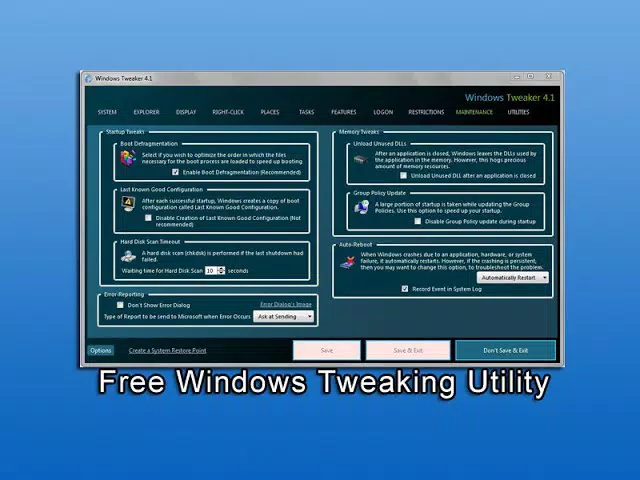
The user interface of Tweaking Utility reflects its technical focus, offering a functional but dated layout. Navigation is structured through hierarchical menus, which may require some time to master, particularly for users unfamiliar with advanced system tools. The fixed window size and lack of responsive design elements can lead to excessive scrolling, potentially impacting usability on smaller displays.
Although the developer did not list formal performance metrics, the app’s lightweight footprint of 1.3 MB suggests minimal impact on system resources. It operates efficiently on older hardware typical of Windows XP environments, with no reported lag or instability during standard use. Responsiveness appears consistent across different device categories, though detailed testing across diverse configurations was not disclosed.
Stability is a key strength, with no evidence of crashes or data corruption reported in the available documentation. The app maintains its settings reliably across reboots and user sessions. However, the absence of modern UI conventions—such as dark mode, touch support, or dynamic layouts—may deter casual users or those accustomed to contemporary software aesthetics.
Platform Compatibility & Technical Requirements
Tweaking Utility is designed exclusively for the Windows operating system. The app is compatible with Windows XP, as confirmed by the developer. Specific minimum OS requirements were not listed, but the app’s version (1.2.5) and file size (1.3 MB) indicate it is optimized for older systems.
The application is distributed as a standalone executable, requiring no installation process. This makes it easy to deploy on locked-down or restricted machines. The developer did not specify compatibility with other platforms, including modern versions of Windows, macOS, or mobile operating systems.
Given its targeted nature, the app does not support Android, iOS, or web-based access. Users seeking to run this tool on newer systems may face compatibility issues due to the absence of support for current Windows versions.
Pros and Cons
Pros
- Provides deep system customization beyond standard Windows settings
- Supports password protection and configuration portability
- Lightweight at only 1.3 MB, suitable for older hardware
- Includes detailed help documentation for each setting
- Designed for IT professionals and power users managing legacy systems
Cons
- Interface may be difficult to navigate for non-technical users
- Fixed window size can cause scrolling issues on smaller screens
- Not compatible with modern Windows versions or other platforms
- Limited visual appeal and outdated UI design
- Developer did not provide information on update frequency or support lifecycle
FAQ
Is Tweaking Utility safe to use on Windows XP?
Yes, the app is designed specifically for Windows XP and operates without known malware or harmful components. However, users should exercise caution when modifying system settings.
Can I use this tool on newer versions of Windows?
The developer did not confirm compatibility with Windows versions beyond XP. It is not recommended for use on modern operating systems.
Is Tweaking Utility free to download and use?
Yes, the app is available at no cost. No in-app purchases or subscription models are associated with the tool.
How do I install Tweaking Utility?
The app is distributed as a standalone executable. Simply download the file and run it directly—no installation is required.
Does the app support automatic updates?
Specific update mechanisms were not disclosed by the developer. Users should manually check for new versions on the official source.
Final Thoughts
Tweaking Utility stands as a powerful and focused tool for IT professionals and advanced users managing Windows XP systems. Its ability to deliver extensive customization, secure configuration management, and cross-machine portability makes it an essential utility in legacy environments. While its interface may feel outdated and its usability limited to technically inclined users, its core functionality remains highly relevant in niche scenarios.
For organizations maintaining older systems for archival, industrial, or compatibility reasons, this app offers a reliable and efficient way to maintain control over system behavior. Its lightweight nature and lack of installation requirements further enhance its practicality in restricted or sensitive environments.
Download Tweaking Utility now


